

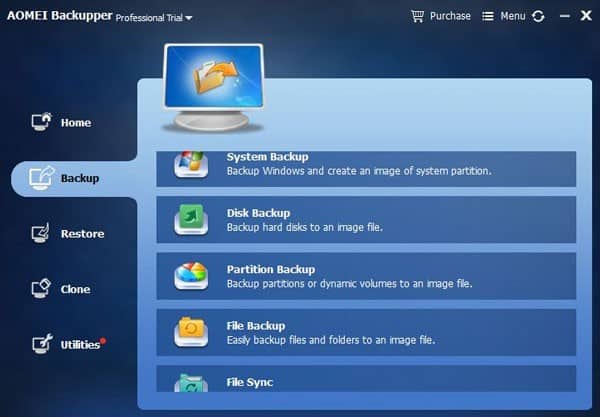
The AOMEI Backupper Standard 4.6.1 is a free data backup and restore software purely made for Windows PC and Laptop. This is the best and easiest all-in-one PC backup, sync, restore, and clone tool for both Standard (Free) and Business edition. You can use this software easily even if you don’t have that much technical knowledge.
The AOMEI Backupper Standard 4.6.1 tool comes with a size of 145 MB for free. The most interesting feature is that you can download and use this tool on all Windows 10/8.1/8/7/Vista/XP versions. The software also provides a “Driver Booster” tool for free as well. It helps you to keep all of your Windows Drivers up-to-date easily.
Already so many free PC backup and recovery applications available out there, but this one is really advanced. The interface is quite easier of backup program in terms of the advanced features. The software recently updated to a newer AOMEI Backupper Standard 4.6.1 version. Look at the following features and methods of backup and restore process closer:
show
AOMEI Backupper: Main Features and Options
System Requirements:
Supported Operating Systems (OS):
Supported File Systems and Storage Devices:
More About AOMEI Backupper:
Summary:
AOMEI Backupper: Main Features and Options
- Files and Folders Backup
- System Backup
- Disk Backup
- Partition Backup
- Schedule Backup
- Incremental & Differential Backups
- Backup Dynamic Disk Volumes
- Backup to NAS
- Files and Folders Restore
- System Restore
- Partition and Disk Restore
- Disk Clone
- Partition Clone
- Create Bootable Disc
- And More….

Join our subscribers list and be updated…
System Requirements:
- A 500 MHz x86 or compatible CPU required.
- A minimum 256 MB RAM required.
- Mouse or other pointing devices (recommended).
- Additionally, AOMEI Backupper supports creating bootable rescue media so, you may need CD-RW/DVD-RW drive for bootable media creation.
Supported Operating Systems (OS):
- Microsoft Windows XP, Vista, 7, 8, 8.1, 10 (all editions, 32-bit, and 64-bit)
- Microsoft Windows Server 2003, 2003 R2, 2008, 2008 R2, Windows Home Server (WHS) 2011, Windows Small Business Server (SBS) 2011, Windows Server 2012 and 2012 R2 (all editions, 32-bit, and 64-bit)
Supported File Systems and Storage Devices:
- FAT16, FAT32, NTFS, ReFS, Ext2/3, ExFAT files are supported for this program.
- AOMEI Backupper supports almost all storage devices recognized by Windows. Such as IDE, SATA, SCSI, SSD, USB external disks, hardware RAID, Network Attached Storage (NAS) and more. Additionally, AOMEI Backupper supports MBR and GPT disk standards and works effectively with UEFI boot as well.
Please Note: The Partition of Windows also can be backed up easily with this software. The tool runs on Volume Shadow Copy Service (VSS), which allows user to perform backup without shut down the computer.

More About AOMEI Backupper:
- You can take Backup of systems and create a system image to keep your Windows and applications data.
- Perform a backup of full hard disks (HDDs), Solid-State Drives (SSDs) or specified partitions to create an image file.
- You can enable Schedule backups or syncs for your most important files and folders.
- Set and feel free with automatic backups or incremental/differential backups.
- Make a Clone of a smaller HDD to a larger HDD for disk upgrade, or clone HDD to SSD for better performance.
- Automatic file synchronization -> Set a schedule to automatically sync files from the source location to destination daily, weekly or monthly.
- You can exclude custom subfolders, hidden files, and any file types from backup.
- Set backup with password protection.
- Manage backups according to jobs created like today, this week, or any other custom date.
- Similarly, Restore process is easy like the way backup jobs were created.
- You can restore the specific files or a full backup to any destination. Even in the original folder.
- The email notifications also supported. So, you can receive a confirmation email after a successful complete backup. It includes all details such as start & stops timing, backup path, and any other error log.
- The USB devices will be backed up automatically while plugged in.
Info: The system backup image file can be restored to a different PC/Laptop with dissimilar hardware. You can check the full details at AOMEI official website.
Summary:
There are so many backup and rescue tools available in the market. A few of them provides a free version or trial version with a limited number of features. Maybe most of you have tried so many applications but that didn’t stand out as per your expectation. Some of them does have a very quirky and not so user-friendly interface or menu. But personally, I prefer the AOMEI Backupper Standard due to easy to understand and advanced features.
Good:
1. Though the AOMEI Backupper tool is pretty advanced, I mostly like the simple and easy to use interface. As a normal user, I don’t have to set anything extra from the settings or menu.
2. The system image file creation and the scheduled backup option with email notification feels good than other tools.
Not So Good:
1. The backup process don’t have pause/resume feature, which is painful instead of direct cancel the backup.
2. During backup process, I was unable to move on other options. That should be fixed by the AOMEI.
In addition, you can also merge incremental backup files to run a full backup by using batch scripts. This feature is available in the AMOEI Backupper Professional version.
