
Close Menu
    Facebook X (Twitter) Instagram
    • Home
    • About
    • Disclaimer
    • Join Gadget Headline
    • Privacy Policy
    • Contact US
    Facebook X (Twitter) Instagram Pinterest Vimeo
    Gadget HeadlineGadget Headline
    • Home
    • About
    • Disclaimer
    • Join Gadget Headline
    • Privacy Policy
    • Contact US
    Subscribe
    Gadget HeadlineGadget Headline
    Home»Technology»Wearables»How to Create/Delete A Watch Face from your Apple Watch
    Wearables

    How to Create/Delete A Watch Face from your Apple Watch

    Sachin GuptaBy Sachin GuptaOctober 16, 2020Updated:May 26, 2025No Comments3 Mins Read
    Share Facebook Twitter Pinterest LinkedIn Tumblr Reddit Telegram Email
    Share
    Facebook Twitter LinkedIn Pinterest Email

    If you’re looking for how to create and delete face watch from your Apple Watch, you’re on the right post. Apple Watch is a decent device powered by Apple and quickly becomes the best-selling wearable device. Each series is sold based on multiple variants like color, size, and material. Apple Watch is the only product that hasn’t branded as “iWatch” because the inventors think that it sounds in a more visionary sense as it is.

    Apple Watch offers features like fitness tracking, health-oriented capabilities, and wireless telecommunication, and integrated with iOS and other Apple devices. Also, you can add more information on your watch face, and customize it according to your need. Without further ado, let’s get started.
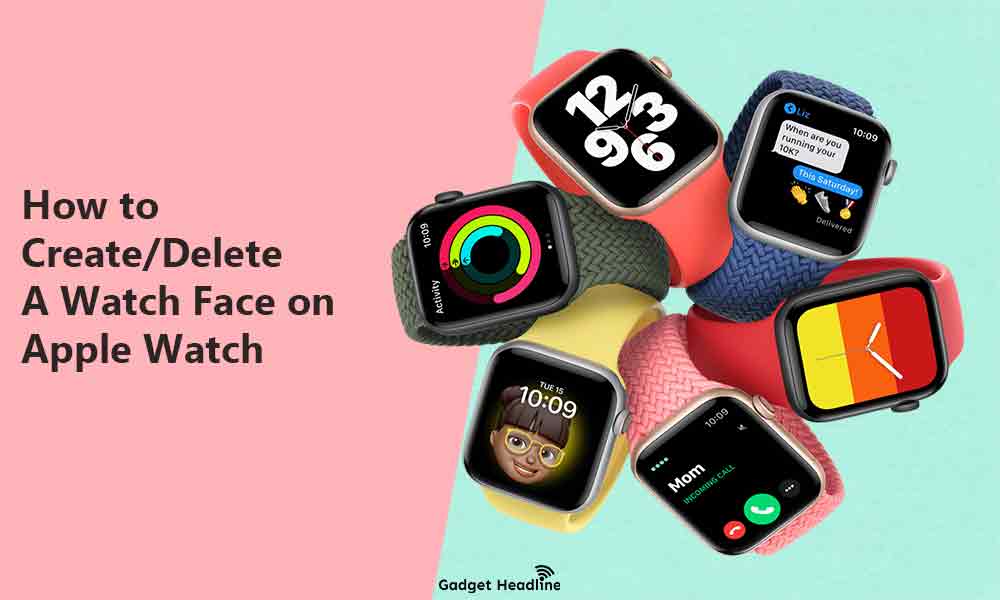
    How to CreateDelete A Watch Face from your Apple Watch

    Contents
    show
    1)
    Apple Watch: How to Switch the watch face

    1.1)
    How to Create a new watch face on Apple Watch

    1.2)
    How to Delete a watch face from Apple Watch

    Apple Watch: How to Switch the watch face

    Apple Watch comes with a variety of watch faces, most of which you can customize.

    • On your Apple Watch, swipe left or right from edge to edge.
    • Watch face will arrive, now you can use it.

    How to Create a new watch face on Apple Watch

    • Press on the Digital Crown to the watch face.

    How to Create/Delete A Watch Face from your Apple Watch

    • Touch and hold the display > swipe right till the last slide > Tap on the Add

      How to Create Delete A Watch Face from your Apple Watch

      button.

    • To select a watch face, turn the Digital Crown > Tap the watch face that you want. Your new watch face is ready to use.
    • To customize the watch face, just touch and hold the display > Tap to Edit.

    Must Read: How to Add More Information on your Apple Watch Face

    How to Delete a watch face from Apple Watch

    • Visit your current watch face > touch and hold the display.
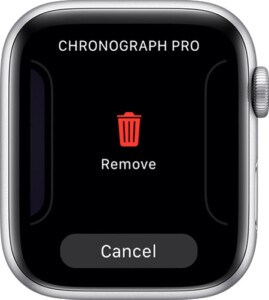
    How to Create/Delete A Watch Face from your Apple Watch

    • Swipe right or left to see the check the watch face you want to remove.
    • Swipe it up.
    • Tap on Remove.

    However, if in case, you want to create/add a watch face again on your Apple Watch then you can do it later by following the adding watch face steps mentioned above.

    That’s it for now guys. We assume you’ve found this Create/Delete Watch Face Apple Watch guide very useful. You can comment below for your further queries or your experiences. Till then stay tuned for more info. You can also follow us on Google News or Telegram group below for real-time notifications whenever Gadget Headline publishes any post.

    [su_button url=”https://news.google.com/publications/CAAqLggKIihDQklTR0FnTWFoUUtFbWRoWkdkbGRHaGxZV1JzYVc1bExtTnZiU2dBUAE?oc=3&ceid=IN:en” target=”blank” style=”3d” background=”#32afed” size=”5″ center=”yes” radius=”0″ icon=”icon: newspaper-o” text_shadow=”5px 10px -5px #444f57″ rel=”nofollow”]Follow Us on Google News[/su_button]

    [su_button url=”https://telegram.me/gadgetheadlinenews” target=”blank” style=”stroked” background=”#32afed” size=”5″ center=”yes” radius=”0″ icon=”icon: paper-plane” text_shadow=”5px 10px -5px #444f57″ rel=”nofollow”]Join Telegram for Tech Updates[/su_button]

    Credit: Apple Support

    Apple Apple Watch How to Smartwatch Watch Face watchOS
    Share. Facebook Twitter Pinterest LinkedIn Tumblr Email
    Previous ArticleHow to Add More Information on your Apple Watch Face
    Next Article Fix Genshin Impact MSVCP140.dll Missing Error – Gadget Headline
    Sachin Gupta

    Hey! I'm Sachin an experienced content writer previously worked in various trends, more than two years of my life I have been creating content for different companies. Engineer, Blogger, Creator, Photographer, Traveller all is “Me”. Believes in Hardwork, always creative to draft the best.

    Related Posts

    Wearables

    Apple AirPods Pro 3 Redefine Audio with AI-Powered Adaptive Sound and Health Tracking

    September 22, 2025
    Wearables

    Samsung Galaxy Glasses Unveiled: Game-Changing AR Hits Shelves in 2025

    August 29, 2025
    Wearables

    Next-Gen Smart Ring Revolutionizing Wellness Tracking

    August 8, 2025
    Add A Comment
    Leave A Reply Cancel Reply

    • Facebook
    • Pinterest
    • YouTube
    • LinkedIn
    • Reddit
    • Recent Posts

    Volkswagen Accelerates Electric Revolution: €10 Billion Investment in German EV Battery Plants

    November 6, 2025

    Google Announces Landmark Investment in Germany: A Major Leap for AI and Cloud Infrastructure

    November 6, 2025

    Finland Captures CO2 to Create World-First Biodegradable Plastic at Industrial Scale

    November 5, 2025

    Tech Consortium Achieves Breakthrough in Wireless Power, Enabling a Future of Battery-Free Devices

    November 4, 2025

    Major Social Media Platform Unveils Sweeping “AI-Powered Chronological Feed” and Enhanced Creator Monetization Tools

    November 4, 2025

    Intel Unveils Panther Lake: Next-Gen AI Chips Set to Dominate PCs and Edge Devices in 2026

    November 1, 2025
    Facebook X (Twitter) Instagram Pinterest
    © 2025 GH. Designed by Gadget Headline.

    Type above and press Enter to search. Press Esc to cancel.