


Riot Games is known for its couple of best-in-class video games and Valorant is one of them. It’s a free-to-play first-person tactical hero shooter title available for Windows only which offers online gaming mode. Sadly, there are plenty of unfortunate players encountering the VALORANT VAN 9002 Error on the PC while launching the game.
Well, online gaming or multiplayer gaming can go through cheats and hacks so badly these days. As the Riot Games team is active enough to prevent in-game cheats, hacks, and exploits, it includes anti-cheat software in VALORANT to help genuine players have fair and competitive gameplay.
Riot Games can precisely monitor and prevent suspicious activities in Valorant caused by any third-party software, external hacks or cheats, etc. However, sometimes the in-built anti-cheat protection called ‘VANGUARD’ can automatically start preventing players from getting into the game or connecting to the servers, unexpectedly.
It’s worth mentioning that even some of the genuine VALORANT players might also get blocked from launching the game or getting into the gameplay sessions due to some authorization failure or the Windows system exploit protection settings. So, if you’re also one of the victims to encounter such an issue then ensure to follow this troubleshooting guide to fix it.
show
What is Exploit Protection on Windows OS?
Steps to Fix VALORANT VAN 9002 Error
What is Exploit Protection on Windows OS?
Exploit Protection on Windows OS basically helps detect and protect the machine from malware or virus. However, it seems that this specific feature doesn’t interfere with regular applications and works silently in the background.
So, the CFG feature needs to work properly to avoid getting the exploit protection disabled error while launching some apps.
Steps to Fix VALORANT VAN 9002 Error
VAN9002 Error Code is one of the common issues on VALORANT which can occur whenever Vanguard detects any missing CFG (Control Flow Guard) on your Windows system.
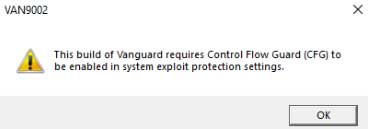
As per the error message, it says “This build of Vanguard requires Control Flow Guard (CFG) to be enabled in system exploit protection settings.” while startup.
So, if you’re getting the Error Code VAN9002 when launching the VALORANT game or trying to log into it, the chances are high that you have Windows Exploit Protection disabled.
Get the latest tips and guides delivered to your inbox

Or click on this link to subscribe email newsletter. We also hate spam! You can unsubscribe at any time. Check to follow.it Privacy and Our Privacy.
You’ll just need to enable the exploit protection feature on your PC by following the steps below. Now, without further ado, let’s get into it.
- Open the Start menu on Windows.
- Type and search Exploit protection in the search bar.
- Now, click on Exploit protection to open it.
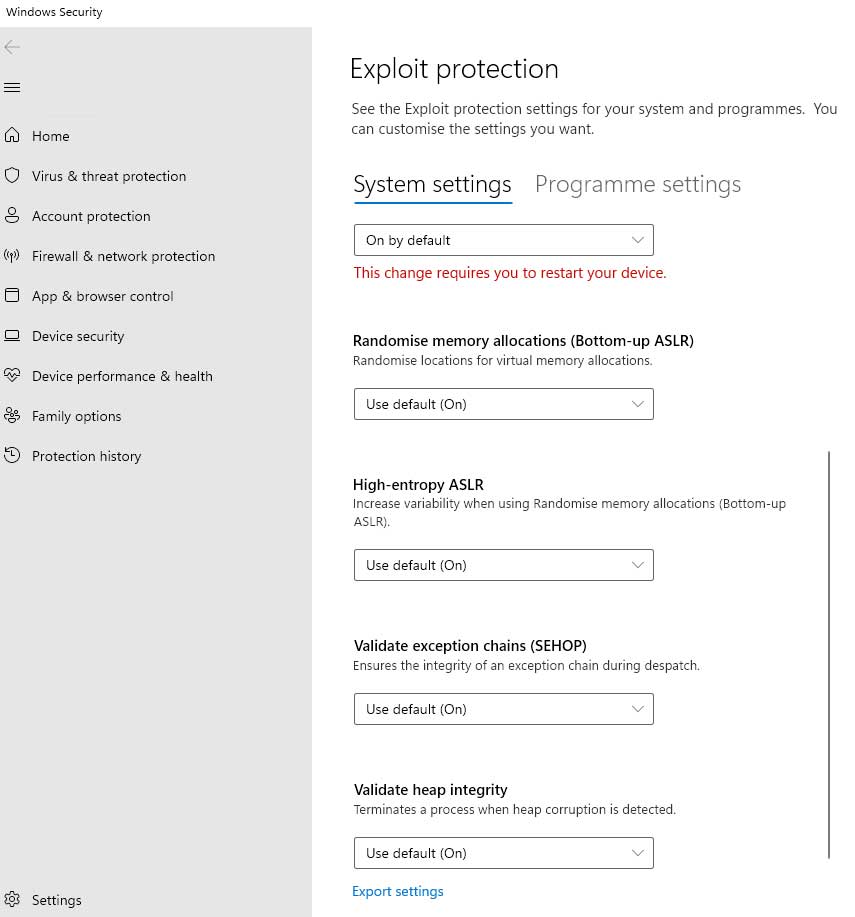
- Under the System settings tab, you’ll see a couple of protection settings as follows.
- Just make sure to select Use default (On) for all settings. If prompted by User Account Control, click on Yes to confirm.
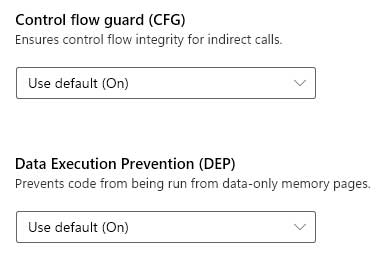
- Control flow guard (CFG) – Use default (On)
- Data Execution Prevention (DEP) – Use default (On)
- Force randomization for image (Mandatory ASLR) – Use default (On)
- Randomized memory allocation (Bottom-up ASLR) – Use default (On)
- High-entropy ASLR – Use default (On)
- Validate exception chains (SEHOP) – Use default (On)
- Validate heap integrity – Use default (On)
- Once done, it’s required to restart your PC to apply changes.
Before getting to any conclusion, it’s also recommended to cross-check whether your Windows PC is ready to work properly or not. You can follow the steps below to ensure a couple of things as well.
- Next, open Exploit protection again > Go to the Program settings tab.
- Make sure to scroll through the added programs list carefully and search for Riot Games, Riot Vanguard, VALORANT, or any other Riot Games-related program is present or not.
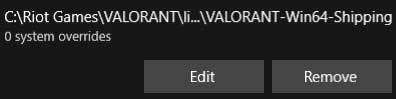
- If available in the list, just click on the entry, and select Remove.
- Do the same step for each Riot Games or VALORANT, or VANGUARD-related entry.
- You’re done. Now, you won’t get the VAN9002 error on VALORANT.
For more news updates and guides, follow this blog. If you have any queries just mention them in the comment section below, till then stay tuned.
You can also follow us on Google News and Telegram Channel for real-time notifications whenever we publish any post.
Follow us on social media – Twitter, Facebook, and Instagram. You can also subscribe to our newsletter for daily updates.
