

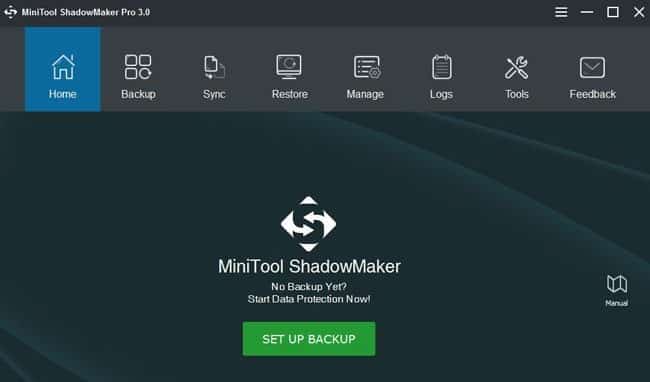
The MiniTool ShadowMaker is free backup software, comes with the Professional backup solution to keep your PC/Laptop data safe. This free data backup and data recovery software also provides the backup of the Windows OS, files/folders, partitions, and disks. This tool will be very useful at the time accidental format or any kind of data loss. The MiniTool ShadowMaker Free 3.0 version is recently upgraded. It comes with four new features like:
- Add File Synchronization: The MiniTool ShadowMaker 3.0 has recently added the File Sync feature, which will help the users to synchronize files/folders to different locations.
- Add Network to the backup destination path/folder: It provides the backup path/destination choice so that you can choose the source and destination folder easily.
- Bug fixed for the file restore: File Restore is an important feature of MiniTool ShadowMaker software.
- Enhances the backup efficiency: It features Improved backup efficiency to reduce the backup time.
You can also do the following tasks in order to get some extra protection for all Microsoft Windows versions. The following mentioned features are very useful in terms of free data backup and recovery tool.
- Create a Clone Hard Drive Windows 7: This feature Performs the OS migration without reinstallation & disk upgrade to improve PC performance.
- Fix Windows 10 Reset Stuck: You can input the IP address of the computer in the LAN option to protect data for the remote computer.
- Restore the Previous Version of Windows: Provides an extra layer of data protection by encrypting the data and backup images.
- Migrate Windows 10 easily: Easily migrate Windows 10 operating system for the future needs.
- Create a Recovery Drive of Windows 10: Now you can create a recovery drive of Windows 10 OS easily. (Newly added feature)
- Create a Clone Larger HDD to Smaller SSD: You can create a copy of larger HDD to a smaller SSD to reduce disk space.
show
Main Highlighted Features of MiniTool ShadowMaker
System Requirements (Minimum):
Supported Operating Systems:
Supported File Systems:
Supported Storage Media:
Bootable Media Builder feature:
Summary:
Main Highlighted Features of MiniTool ShadowMaker
- Quick File/System/Disk Backup: You can quickly backup necessary files/folders, system and HDDs (hard disk drives) for data protection.
- File Sync: File sync is an important feature to synchronize a file to other destination to keep your data safe.
- Safe System Restore: You can Safely restore the system to the previous condition/state of your Windows system and disks whenever needed.
- WinPE Bootable Media Builder: Create a bootable media to help restore the operating system to the previous condition easily.
- Add Boot Menu: Add MiniTool ShadowMaker to the boot menu to restore system without a bootable media.
- Incremental Backup Scheme: This feature can help to retain the latest backup version and manage the disk space by removing the previous backup images.
- Backup Schedule: This feature helps to create a backup file on a regular basis to create automatic file backup. You can also set the schedule backup timing, intervals, and daily/weekly/monthly/event basis.
Subscribe to our Newsletter:
System Requirements (Minimum):
- Processor Pentium 1 GHz
- 1 GB of RAM for 32-bit Windows OS
- 2 GB of RAM for 64-bit Windows OS
- 1.5 GB free disk space
Supported Operating Systems:
- Microsoft Windows 10 (all editions)
- Windows 8 (all editions)
- Windows 7 (all editions)
- Microsoft Windows Vista (all editions)
- Windows XP (all editions)
Supported File Systems:
- exFAT
- FAT16
- FAT32
- NTFS
- Ext2/3/4
Supported Storage Media:
- HDD
- SSD
- USB External Disks
- Hardware RAID (redundant array of independent disks)
- Network Attached Storage (NAS)
- Home File Server
Bootable Media Builder feature:
The WinPE Bootable Media Builder feature can be used to create a bootable disc or USB drive which can be used to boot the computer to access the MiniTool Recovery menu. This will perform a few recovery actions when the computer can’t boot from the system OS normally.
Summary:
The restore system point is an essential part to allow users to restore your computer to an earlier condition. If the System Restore of Windows fails to work, you can try to choose MiniTool ShadowMaker software for free. You can also use different editions of this professional backup software such as Free, Trial, Pro, Business edition. The trial edition can be used for 30 days for free. To know more about this free data backup and data protection solution, you can check the official website.
Pros:
- Easy to use tool with advanced features.
- Secure and easy data rcovery system.
- Scheduled, Incremental, and Differential Backup options available.
- Provides detailed logs also.
- Accessible to other tabs and options during backup process.
Cons:
- Slightly overlapping tabs and can’t properly adjust/minimize the window.
- Takes a huge disk space in terms of backup file.
