


If you’re a WhatsApp user, I’m sure that you have encountered its policy notification. The notification message accompanies that “WhatsApp is updating its terms and privacy policy” and also it mentioned the processing of user data. Which is not at all good if you’re a privacy lover. And if you choose to ignore the policy then you will no longer have access to WhatsApp from the 8th of February. In such a case, if you want to delete your WhatsApp account permanently, you’re on the right post.
In this article, we’ll be discussing how to delete a WhatsApp account on any device. Actually, deleting your WhatsApp account is much easier than you think, so no need to follow that lengthy article, that will let you end up getting confused. Just follow the explanatory guide that we’ve managed to provide you to delete your WhatsApp account. Without further ado, let’s get started.
hide
How to Delete WhatsApp Account on any devices
For Android Devices
For iOS Devices
Delete WhatsApp account on KaiOS
Why should I delete WhatsApp?
How to Delete WhatsApp Account on any devices
WhatsApp is available on Android, iOS, and KaiOS, follow the guide accordingly.
For Android Devices
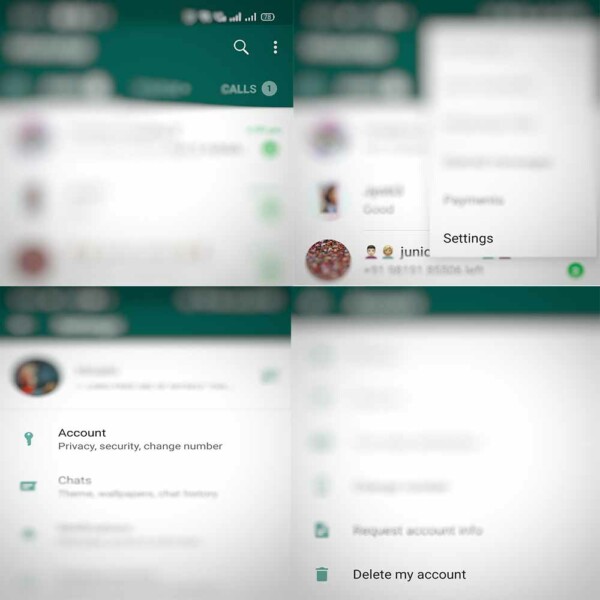
- Visit WhatsApp and head towards Settings, located at the right side of the screen as three vertical dots.
- Tap on Account.
- Then choose to Delete my account.
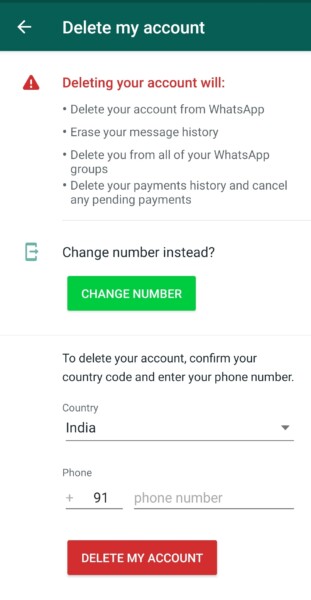
- WhatsApp will ask you to confirm the process and confirm your phone number.
- Once done, tap on “Delete my account”.
- In the end, the company will ask you the actual reason for deleting the account, choose accordingly.
For iOS Devices
- Visit WhatsApp on your iPhone.
- Now, switch to the Settings sections using the navigation bar.
- Now, tap on Account.
- Now, choose to “Delete my Account”.
- Once done, you can uninstall the application.
Read More: How to Shift from WhatsApp to Telegram App? What are the benefits?
Delete WhatsApp account on KaiOS
- If you’re using KaiOS.
- Open the WhatsApp.
- Go to Settings > account > Delete My account.
Once you’ve deleted your WhatsApp account, you will no longer access your account. WhatsApp will delete your account completely within 90 days, this includes your groups, chats, and everything.
Why should I delete WhatsApp?
- If you choose to decline the WhatsApp policy, you will no longer be able to access WhatsApp.
- Your data will be no longer be able to share with Facebook.
- If you choose to uninstall WhatsApp, the account won’t get deleted.
Moreover, you can choose to switch on the Signal app or other messaging application which will be the best alternative to WhatsApp.
That’s it for now. You can comment below for your further queries or your experiences. Till then stay tuned for more info. You can also follow us on Google News or Telegram group below for real-time notifications whenever Gadget Headline publishes any post.
[su_button url=”https://news.google.com/publications/CAAqLggKIihDQklTR0FnTWFoUUtFbWRoWkdkbGRHaGxZV1JzYVc1bExtTnZiU2dBUAE?oc=3&ceid=IN:en” target=”blank” style=”3d” background=”#32afed” size=”5″ center=”yes” radius=”0″ icon=”icon: newspaper-o” text_shadow=”5px 10px -5px #444f57″ rel=”nofollow”]Follow Us on Google News[/su_button]
[su_button url=”https://telegram.me/gadgetheadlinenews” target=”blank” style=”stroked” background=”#32afed” size=”5″ center=”yes” radius=”0″ icon=”icon: paper-plane” text_shadow=”5px 10px -5px #444f57″ rel=”nofollow”]Join Telegram for Tech Updates[/su_button]
